A Powerful and Simple Captcha in PHP
Posted: Fri Jul 29, 2011 1:04 am
Hey guys, here's a simple way of making a Captcha in php to prevent bots from entering your page to spam and make your life miserable. 
First off let's make a new page called myowncaptcha.php
We'll need some random words so let's start making them.
<?php
$vocals= array('a','e','i','o','u','y'); // Added "y" for more variety
$letters = array('a','b','c','d','e','f','g','h','i','j','k','l','m','n','o','p','q','r','s','t','u','v','w','x','y','z');
$threechar = $vocals[rand(0,5)] . $letters[rand(0,25)] . $vocals[rand(0,5)];
$twochar = $vocals[rand(0,5)] . $letters[rand(0,25)];
$twochar2 = $vocals[rand(0,5)] . $letters[rand(0,25)];
$fourchar = $vocals[rand(0,5)] . $letters[rand(0,25)] . $vocals[rand(0,5)] . $letters[rand(0,25)];
You can make howmany characters you want.
$fourwords = array("$threechar", "$twochar", "$twochar2", "$fourchar");
$chosenword = $fourwords[rand(0,3)]; // The word they will write to access.
Now we'll write " write the 'numbered' word to access" but remember it has to be exactly as the chosenword variable.
echo "Write the ";
if ($chosenword == $fourwords[0])
{ echo "first "; }
elseif ($chosenword == $fourwords[1])
{ echo "second "; }
elseif ($chosenword == $fourwords[2])
{ echo "third "; }
elseif ($chosenword == $fourwords[3])
{ echo "fourth "; }
echo "word to access <br />";
foreach($fourwords as $value)
{
echo '"' . $value . '", '; // Dont confuse the double quotes, they're for the string.
}
Now let's write the form.
<form method="get" action="checkcaptcha.php">
<input name="captcha" size="8" type="text" />
<input type="submit" value="submit" />
<input name="chosenword" type="text" value="<?php echo $chosenword;?>" style="visibility: hidden;" /><?php //remember that this input still makes some space.?>
</form>
(the input "chosenword" was made to pass the variable through the url, ther're other ways to pass variables and maybe with more efficiency to another php page but this is the way I'd on this tutorial.)
Now lets make the checkcaptcha.php (it could be the reguser.php page instead, or any other page you want your captcha to work.)
<?php
if($_GET['captcha'] != $_GET['chosenword'])
{
echo "<h2>WRONG!!</h2> Write the correct word. ";
echo "<a href='myowncaptcha.php'>Go back!";
}
else
{
echo "LETS ROCK!"; /// put whatever you like. Probably you will use this to access the reguser.php
}
// GOOD LUCK!!
?>
so it will look something like this: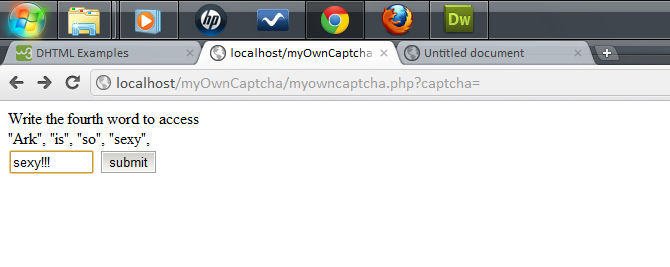
Here are the sources of this lil tutorial:
myowncaptcha.php
checkcaptcha.php
So as far as bots can't read and analyze  you can be sure that this captcha will keep you away from bots.
Good luck!
indie-resource.com Rocks!
First off let's make a new page called myowncaptcha.php
We'll need some random words so let's start making them.
<?php
$vocals= array('a','e','i','o','u','y'); // Added "y" for more variety
$letters = array('a','b','c','d','e','f','g','h','i','j','k','l','m','n','o','p','q','r','s','t','u','v','w','x','y','z');
$threechar = $vocals[rand(0,5)] . $letters[rand(0,25)] . $vocals[rand(0,5)];
$twochar = $vocals[rand(0,5)] . $letters[rand(0,25)];
$twochar2 = $vocals[rand(0,5)] . $letters[rand(0,25)];
$fourchar = $vocals[rand(0,5)] . $letters[rand(0,25)] . $vocals[rand(0,5)] . $letters[rand(0,25)];
You can make howmany characters you want.
$fourwords = array("$threechar", "$twochar", "$twochar2", "$fourchar");
$chosenword = $fourwords[rand(0,3)]; // The word they will write to access.
Now we'll write " write the 'numbered' word to access" but remember it has to be exactly as the chosenword variable.
echo "Write the ";
if ($chosenword == $fourwords[0])
{ echo "first "; }
elseif ($chosenword == $fourwords[1])
{ echo "second "; }
elseif ($chosenword == $fourwords[2])
{ echo "third "; }
elseif ($chosenword == $fourwords[3])
{ echo "fourth "; }
echo "word to access <br />";
foreach($fourwords as $value)
{
echo '"' . $value . '", '; // Dont confuse the double quotes, they're for the string.
}
Now let's write the form.
<form method="get" action="checkcaptcha.php">
<input name="captcha" size="8" type="text" />
<input type="submit" value="submit" />
<input name="chosenword" type="text" value="<?php echo $chosenword;?>" style="visibility: hidden;" /><?php //remember that this input still makes some space.?>
</form>
(the input "chosenword" was made to pass the variable through the url, ther're other ways to pass variables and maybe with more efficiency to another php page but this is the way I'd on this tutorial.)
Now lets make the checkcaptcha.php (it could be the reguser.php page instead, or any other page you want your captcha to work.)
<?php
if($_GET['captcha'] != $_GET['chosenword'])
{
echo "<h2>WRONG!!</h2> Write the correct word. ";
echo "<a href='myowncaptcha.php'>Go back!";
}
else
{
echo "LETS ROCK!"; /// put whatever you like. Probably you will use this to access the reguser.php
}
// GOOD LUCK!!
?>
so it will look something like this:
Here are the sources of this lil tutorial:
myowncaptcha.php
Code: Select all
<html>
<head>
</head>

<?php

//... MyOwnCaptcha made by ARK
//    For indie-resource.com


$vocals= array('a','e','i','o','u','y'); // Added "y" for more variety
$letters = array('a','b','c','d','e','f','g','h','i','j','k','l','m','n','o','p','q','r','s','t','u','v','w','x','y','z');


$threechar = $vocals[rand(0,5)] . $letters[rand(0,25)] . $vocals[rand(0,5)];
$twochar = $vocals[rand(0,5)] . $letters[rand(0,25)];
$twochar2 = $vocals[rand(0,5)] . $letters[rand(0,25)];
$fourchar = $vocals[rand(0,5)] . $letters[rand(0,25)] . $vocals[rand(0,5)] . $letters[rand(0,25)];

$fourwords = array("$threechar", "$twochar", "$twochar2", "$fourchar");
$chosenword = $fourwords[rand(0,3)];  // The word they will write to access.

echo "Write the ";

if ($chosenword == $fourwords[0])
{ echo "first "; }

elseif ($chosenword == $fourwords[1])
{ echo "second "; }

elseif ($chosenword == $fourwords[2])
{ echo "third "; }

elseif ($chosenword == $fourwords[3])
{ echo "fourth "; }

echo "word to access <br />";

foreach($fourwords as $value)
{
echo '"' . $value . '", ';  // Dont confuse the double quotes, they're for the string.
}
?>
<body>
<form method="get" action="checkcaptcha.php">
<input name="captcha" size="8" type="text" />
<input type="submit" value="submit" />
<input name="chosenword" type="text" value="<?php echo $chosenword;?>" style="visibility: hidden;" /><?php //remember that this input still makes some space.?>
</form>


</body>
</html>Code: Select all
<?php
if($_GET['captcha'] != $_GET['chosenword'])
{
	echo "<h2>WRONG!!</h2> Write the correct word. ";
	echo "<a href='myowncaptcha.php'>Go back!</a>";
}
else
{
	echo "LETS ROCK!"; /// put whatever you like. Probably you will use this to access the reguser.php
}

// GOOD LUCK!!
?>Good luck!
indie-resource.com Rocks!
 !
!